Carousel Remix: The Easiest Way to Create a Product Carousel (2026)
The easiest way to make an Instagram product carousel is a carousel remix. Paste a public carousel, drop in your product, and post to Instagram and Facebook with OnPromptAds Brands.
The easiest way to create a product carousel in 2026 is a carousel remix: take a carousel structure that already gets swipes, drop your real product into each slide, then post it to Instagram and Facebook. You do that in OnPromptAds Brands with Carousel Studio. No blank Canva file. No designer brief. No slide-by-slide layout math.
A carousel remix keeps the sequence that made people swipe (hook, proof, product, close) and replaces the original products, headlines, and scenes with yours. The result is a product carousel your store can publish the same day.
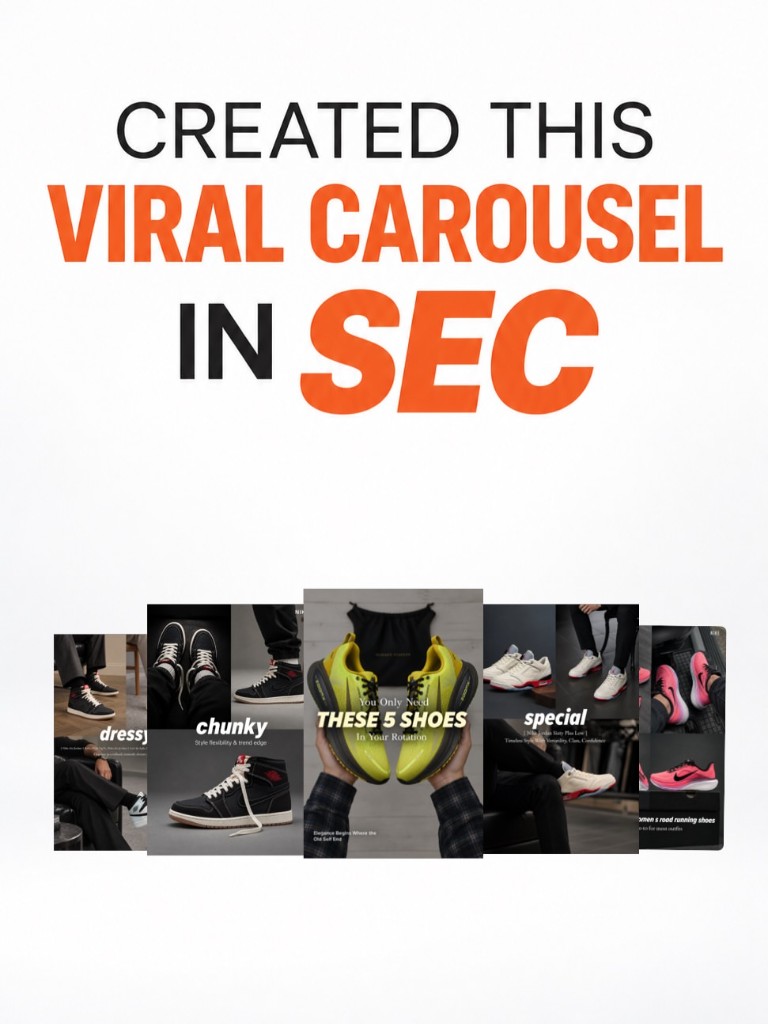
What a carousel remix actually is
A carousel remix is a product carousel built from a proven slide sequence.
You start with one of three inputs:
- A public Instagram carousel link (
instagram.com/p/...) - 2 to 10 screenshots of a carousel you want to follow
- A Library template already tagged for footwear, beauty, apparel, launch, listicle, or how-to
OnPromptAds Brands reads the slide roles (hook, product, detail, close), then rebuilds the frames around products from your catalog. Shopify sync or an imported catalog both work. You edit on-image text, regenerate any slide that is off, and post or download.
That is the whole job. The hard part of carousels was never the idea. It was producing six consistent frames before the trend moved on.
See AI ads for your own store, free
Paste your store URL and watch OnPromptAds turn your live product catalog into ready-to-run Facebook, Instagram and Meta creatives. Founding seats, no card required.
Why product carousels are worth remixing
A single product photo asks for one reaction: tap or keep scrolling. A product carousel asks for a sequence:
- Stop on a hook slide (a list, a claim, a problem)
- Swipe through angles, outfits, ingredients, or use cases
- Land on a close that points to the product page
Ecommerce brands use that sequence for three jobs a single image does poorly:
- Show the set. "5 shoes in the rotation", "the 4-step routine", "what is in the bundle."
- Answer objections in order. Material, fit, how to use, then the offer.
- Reuse one shoot. One catalog photo becomes a cover, a detail frame, and a CTA frame.
Organic carousels also double as ad creative. Post the remix, watch which slide holds attention, then boost the winner. You learn with the feed before you spend in Ads Manager.
Why the usual way feels hard
Most brands see a carousel they want and then do this:
- Screenshot every slide
- Rebuild the layout in Canva or Figma
- Hunt product photos that match the crop
- Rewrite every overlay so it sounds like their brand
- Export 4:5 frames and upload them one by one
That is an afternoon for one post. Weekly posting dies there. A carousel remix skips the rebuild. You approve product truth and copy. The structure is already decided.
| Step | Rebuild by hand | Carousel remix in OnPromptAds Brands |
|---|---|---|
| Find a structure | Save screenshots and notes | Paste a public link, upload slides, or pick a Library template |
| Layout | Draw every frame | Generated from the template |
| Product photos | Download, crop, place | Map from your live catalog |
| Headlines | Write and kern by hand | Edit on the slide, regenerate with a short note |
| Publish | Export, then upload to Meta | Post now, schedule, or download the set |
| Time | Half a day to two days | Minutes |
The easiest carousel remix, step by step
1. Start from a carousel that already works
Open Carousel Studio in OnPromptAds Brands. Paste a public Instagram carousel, upload the slides, or choose a template from the Library.
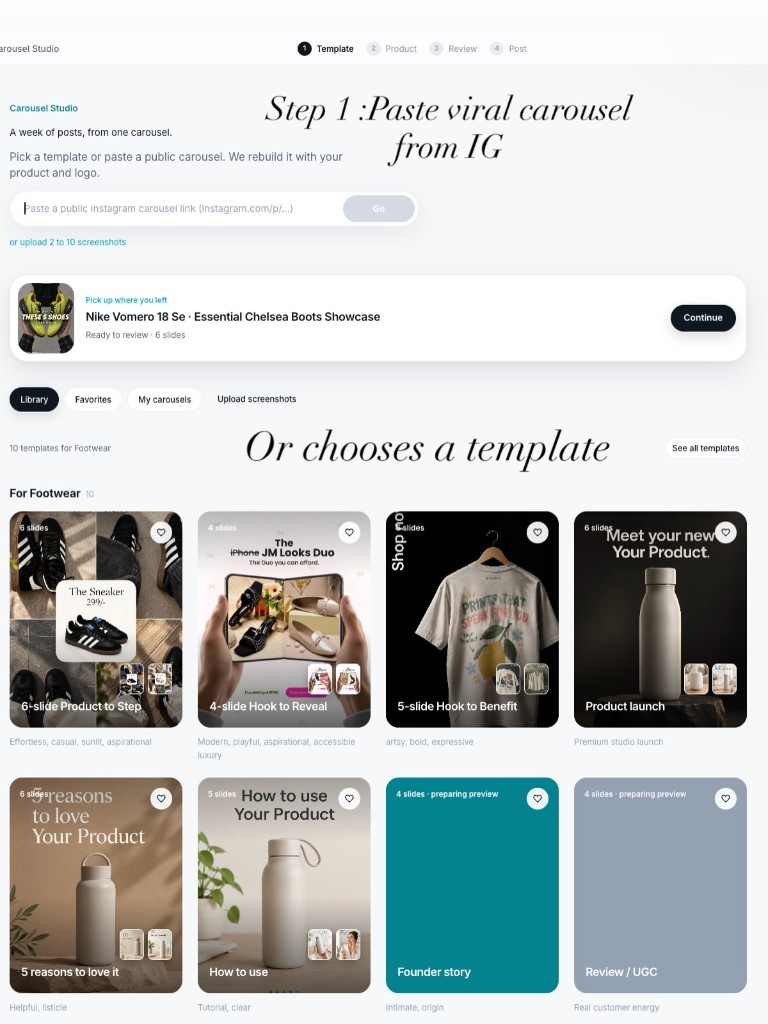
Pick references the way a merchant would, not the way a moodboard would:
- Same job to be done as your product (a routine, a outfit formula, a "you only need these")
- A hook you can say honestly about your catalog
- 4 to 8 slides, enough to swipe, short enough to finish
If the post is private, use screenshots. The link path is for public posts.
2. Put your product on the slides
Match catalog products to slides. One carousel can feature one hero SKU across the sequence, or several SKUs (a listicle, a bundle, a "shop the look").
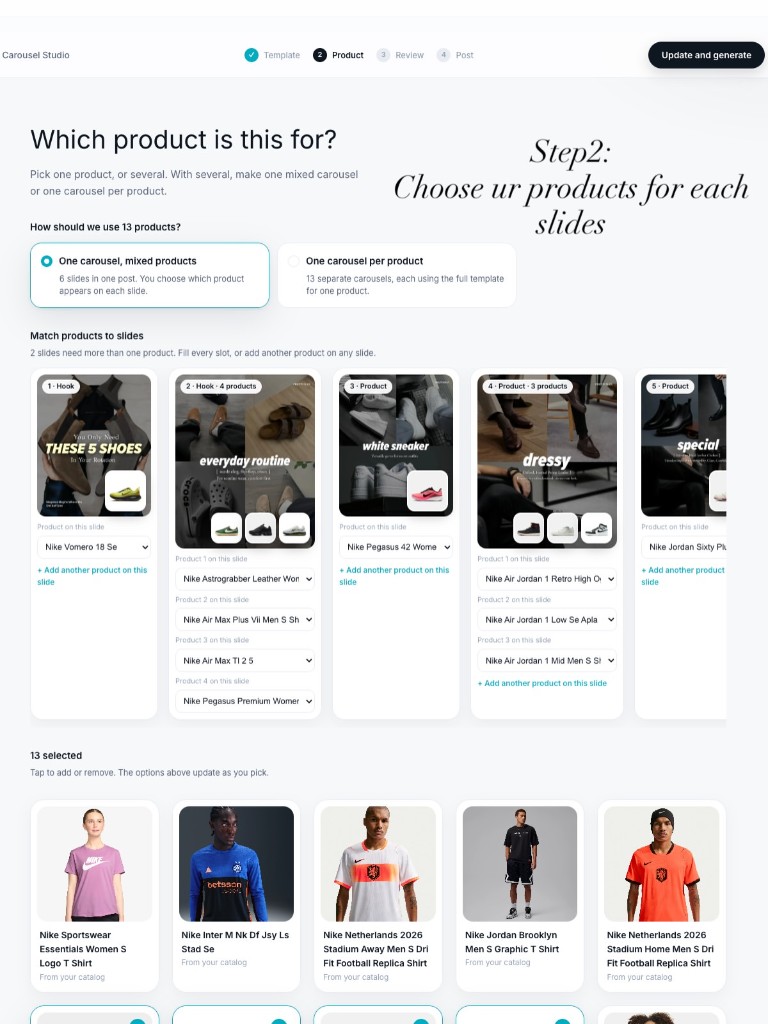
Use the real product photo from Shopify or your import. The remix should look like your store, because the pixels came from your store.
3. Rewrite the words, then regenerate what is off
Open each slide. Change the headline and subtitle so they match your offer. If the scene is wrong, add a short direction ("closer crop", "lighter background", "show the bottle, not the box") and regenerate that slide only.
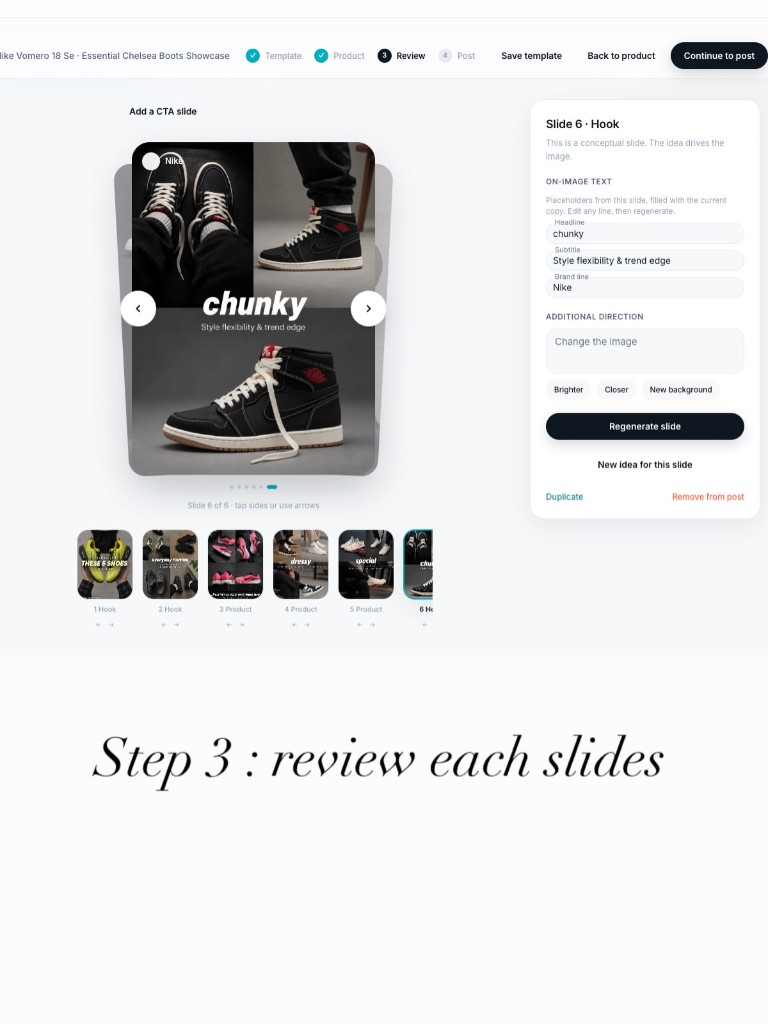
Spend time on two slides:
- Slide 1, the only frame people see before they decide to swipe
- The last slide, the only frame that should ask for the click
Middle slides carry proof: texture, fit, ingredients, what is included, how to use it.
4. Post the carousel to Instagram and Facebook
Write the caption in the studio (or generate one), choose Instagram, Facebook, or both, then post now or schedule. If that brand does not have a social account connected yet, connect it first, then post. You can also download every slide and hand the files to whoever publishes.
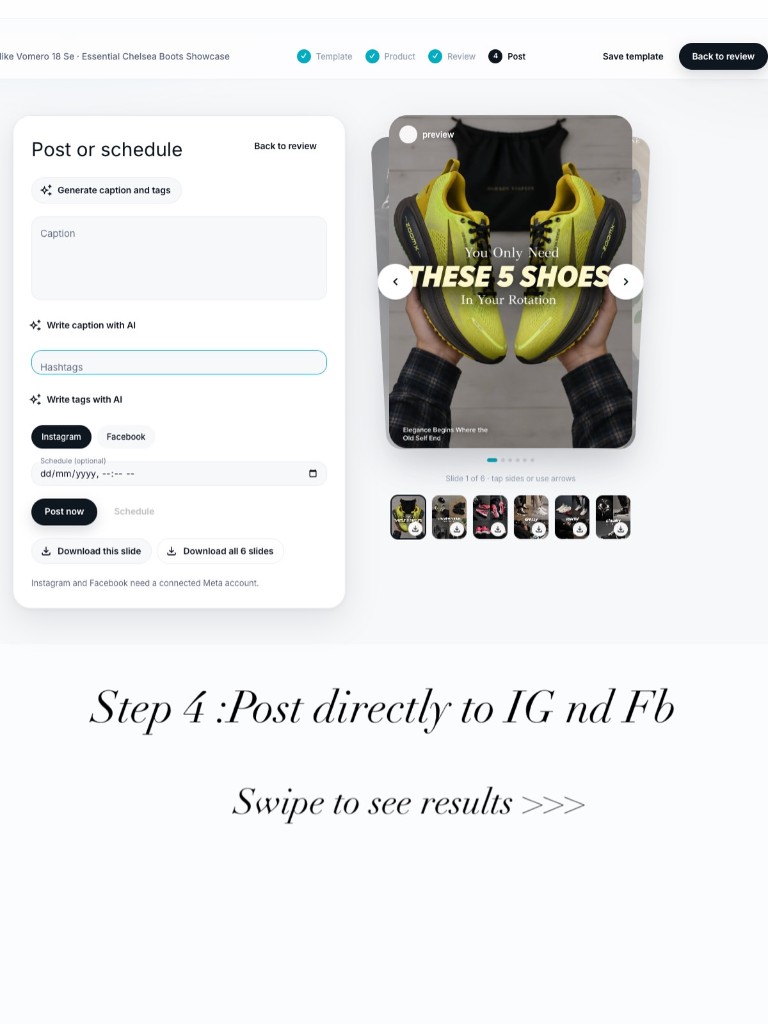
A full walkthrough with a footwear example, slide by slide, is in How to recreate a viral Instagram carousel in seconds.
See AI ads for your own store, free
Paste your store URL and watch OnPromptAds turn your live product catalog into ready-to-run Facebook, Instagram and Meta creatives. Founding seats, no card required.
Carousel remix formulas that fit real products
Use these when you choose a reference or a Library template. Each one is a sequence, not a slogan.
Listicle for a small catalog
Cover: "You only need these 5."
Middle: one product per swipe, one reason each.
Close: "Start with the one you will wear this week" plus the link in the caption.
Best for footwear, apparel, accessories, and any store with a tight hero set.
One hero product, four jobs
Cover: the problem in one line.
Slide 2: the product, named.
Slide 3: the detail people doubt (material, dose, size, scent).
Slide 4: how to use it.
Close: the offer or the bundle.
Best for skincare, supplements, tools, and anything with a learning curve. Pair it with hooks that stop the scroll so the cover is specific.
Routine or outfit
Cover: the outcome ("morning routine", "office to dinner").
Middle: each step or each piece.
Close: shop the set.
Best for beauty, coffee, baby, and apparel brands that sell more than one SKU together.
Before the product, then the product
Cover: a question or a crowded category ("another serum?").
Slide 2: what is different, in plain language.
Slides 3 to 5: proof from the product itself.
Close: where to buy.
Best when you are late to a category and need a reason to exist.
How to choose a carousel worth remixing
A viral carousel is a bad reference if you cannot tell the truth with it. Use this filter before you paste the link:
- Can your product occupy the same role? A 5-item list needs 5 products you actually sell. A 4-step routine needs 4 steps you can show.
- Is the hook yours to say? "Dermatologist formulated" only belongs on the slide if it is true.
- Will slide 1 still make sense with your name on it? If the cover depends on a celebrity, a trend audio, or a joke that is not your brand, pick another reference.
- Is it a carousel of images? Carousel Studio remixes image slides. A Reel is a different format.
Save references in a note as you scroll: niche, hook line, slide count, and why it fits a SKU. Remix the best match on the day you want to post, not three weeks later when the structure is stale.
What to put on each slide
| Slide | Job | What to write |
|---|---|---|
| 1 | Make them swipe | One claim, one number, or one problem. No logo lockup as the whole design. |
| 2 | Name the product | Product name plus the single benefit that earns the next swipe. |
| 3 to 5 | Prove it | Texture, fit, ingredients, what is in the box, a real use. |
| Last | Ask | Where to shop, which SKU to start with, or what the bundle includes. |
Caption rules that match the carousel:
- Repeat the cover promise in the first line, because many people read the caption after swipe one.
- Put the product name and the link cue in the caption. On-image text should stay short.
- One hashtag cluster is enough. The slides do the selling.
If you want the same product in paid static ads after the carousel, use turn product photos into ad creatives for the single-image versions.
Who should use carousel remix
- Shopify and catalog brands that need a product carousel every week and do not have a designer on retainer
- Founders who already know which post in the niche is working and want their SKU in that shape tonight
- Agencies rebuilding one winning structure across several client catalogs
Small teams get the most from it. The constraint was production time, and the remix removes the rebuild. If you are running ads with no in-house design team, the same idea is covered in Instagram ads without a designer.
Mistakes that make a remix look like a copy
- Leaving the reference brand's words on the slide. Change every headline before you post.
- Mapping the wrong product because the photo was convenient. The slide should match the SKU in the caption.
- A cover that needs the caption to make sense. Slide 1 has to work with the sound off and the caption collapsed.
- Eight slides of the same pack shot. Vary the job of each frame: hook, name, detail, use, close.
- Posting before the account is connected. Connect Instagram or Facebook for that brand, then post from the carousel. Otherwise download the slides and publish them yourself.
Frequently asked questions
What is the easiest way to create an Instagram carousel for a product?
Remix one. Paste a public carousel (or upload screenshots, or start from a template) in OnPromptAds Brands Carousel Studio, assign your product to the slides, edit the words, and post to Instagram and Facebook. You are not designing a carousel from a blank page.
What is a carousel remix?
A carousel remix keeps a swipe sequence that already works and replaces the products, headlines, and scenes with yours. The structure stays. The catalog becomes the content.
Do I need Canva to make a product carousel?
No. Carousel Studio builds the slides from a link, screenshots, or a Library template, using photos from your catalog. Canva is optional if you want to tweak an export later.
Can I remix a carousel if I only have one product photo?
Yes. Map that product across the sequence and give each slide a different job: hook, name, detail, how to use, close. One honest photo beats six mismatched stock frames.
Can I post the remixed carousel straight to Instagram and Facebook?
Yes, once that brand's Instagram or Facebook account is connected in OnPromptAds Brands. You can post now or schedule. If it is not connected yet, the studio sends you to connect it. You can also download the slides.
Does carousel remix work for Shopify stores?
Yes. Connect Shopify or import the catalog, then assign those products to slides. The same products are available in the rest of OnPromptAds Brands for image ads and other studios.
How is carousel remix different from asking ChatGPT for carousel ideas?
ChatGPT can suggest a slide outline. A carousel remix produces the actual frames, with your product photo, editable on-image text, and a path to post on Instagram and Facebook.
How many slides should a product carousel have?
Most product carousels that get finished swipes land between 4 and 8 slides. Fewer than 3 rarely tells a story. More than 10 asks for more attention than a cold feed will give.
See AI ads for your own store, free
Paste your store URL and watch OnPromptAds turn your live product catalog into ready-to-run Facebook, Instagram and Meta creatives. Founding seats, no card required.
Make the next product carousel today
Pick a carousel in your niche that you could honestly remake. Open OnPromptAds Brands, paste it into Carousel Studio, put your product on the slides, and post it while the structure is still fresh.
Create a free OnPromptAds Brands account · See how a viral carousel was rebuilt · Founding pricing